
Stay on top of what matters in your email.
Email holds useful information, but your inbox is flooded with less important messages: marketing, notifications and newsletters. It isn't your fault. Email shows messages in the order they arrive, so the ones that matter get buried.
Buoykeeper keeps what matters floating to the top, automatically.
Read-only. Buoykeeper can see your Gmail but can't change, send or delete anything in it.
See what needs your attention
Pulled from 42 emails that arrived this week
Sign and return the field trip form.
from Oakwood Elementary: permission slipDue FridaySend the revised proposal back to the client.
from Re: Q3 scope, your thoughts?Approve the plumber's $480 quote.
from Estimate for the kitchen sinkRSVP for the U10 team photo day.
from Soccer: photo day Saturday
The problem with email
The emails that matter in your life, from your kid's school, your renovation contractor, your two clients, are mixed in with marketing, notifications and receipts, and they're quickly out of sight. You can't unsubscribe your way to staying on top of it, and answering every notification is no fun at all.
We spent the last year rethinking how email should be shown so that it's actually useful. Buoykeeper uses AI to read your email and keeps one short list of what needs you. It sits next to your inbox, so nothing in your Gmail changes.
Buoykeeper reads your email, keeps track of actions, places, due dates and times, and shows you where each one stands. It lives beside your inbox, never instead of it.
What you wish email did, and Gmail never will
- 1
Knows which senders matter in your life (family, friends, your kids' schools and activities, clients and vendors) without you having to give it a list.
- 2
Float the important people, dates and places to the top, where you can see them.
- 3
Keep the context. The important things in your life run for a while: a sports season, a home renovation, a consulting client. Buoykeeper keeps the conversation connected across threads and time.
- 4
Keep the rest of your email within reach for when you need it. Buoykeeper organizes your email into Conversations, Personal, Newsletters (and marketing), Notifications and Receipts, orders & bills.
- 5
Keep you in control. Correct any choice Buoykeeper makes, and it keeps following your rules.
- 6
Leave 100% of your inbox where it is and unchanged, just easier to see.
See how simple staying on top of your email can be, without changing a thing.
Works with Gmail and Google Workspace accounts.
Getting organized in one short interview.
You tell it what you're keeping track of, in your own words. To start, Buoykeeper looks back eight weeks, then checks for new email every hour through the day. When something new comes up, you'll see it in Buoykeeper and can add it as a topic in seconds.
Find the topics that matter
Buoykeeper looks at who you reply to and shows you the groups you're already managing. You name each one in your own words.
Buoykeeper groups the email
Each thread goes with the thing it's about. Related threads are grouped into one case, with a short summary and the next thing to do. Nothing changes in Gmail.
Always keeps up to date
New email is added through the day. If something is in the wrong place, fix it once and Buoykeeper remembers.
What Buoykeeper does
- 01
Topics. It finds the topics that matter to you from what you reply to, and you name them in your words. Nick's are Consulting, Non-profit, Kids' activities and Rental houses. Yours come from your inbox.
- 02
Subjects. Inside a topic, each separate thing you deal with: a property, a client, a team. You name them, and each gets its own cases.
- 03
The right emails for each topic. It finds each topic's email by who sends it, including people who are on a thread, like a vendor or partner.
- 04
Cases. For the topics you reply to, the ones where earlier messages matter, AI writes a case about what each thread is about. A case has a beginning, a middle and an end, and it summarizes the replies so you can keep up quickly. Your own replies are included.
- 05
Actions, dates and places. Each case shows what's due, when and where, so you can find what matters without reading every thread.
- 06
Personal. Email from family and friends that isn't part of a case gets its own place, Personal.
- 07
Conversations. Email from senders you've replied to goes in Conversations.
- 08
Everything else. Marketing, online orders, travel bookings and other notifications are grouped too, so they're there when you want them.
Work accounts
Google Workspace
Cases and conversations are often half your email or more. The cases keep you up to date, so you can check email less often and spend the time with your team and on the work itself. Buoykeeper works especially well on Google Workspace accounts.
Personal accounts
@gmail.com accounts
Cases, Personal and conversations are often less than 15% of your email. The rest is marketing, online orders, plane tickets and notifications. Those are grouped so you can keep up with them, and your personal messages come first.
What it looks like
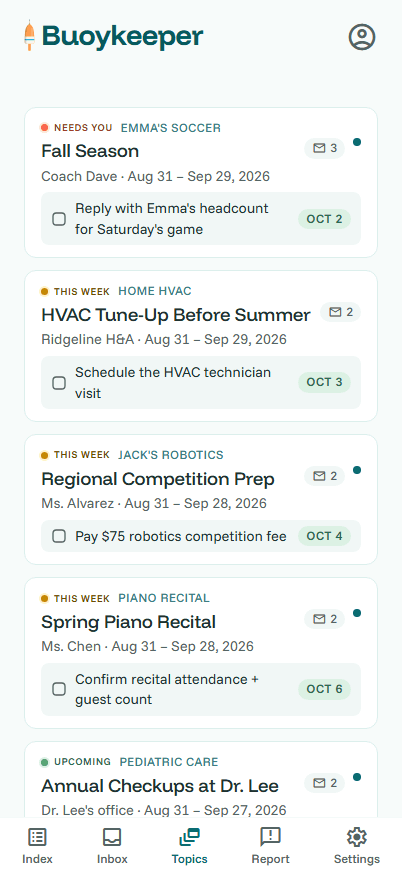
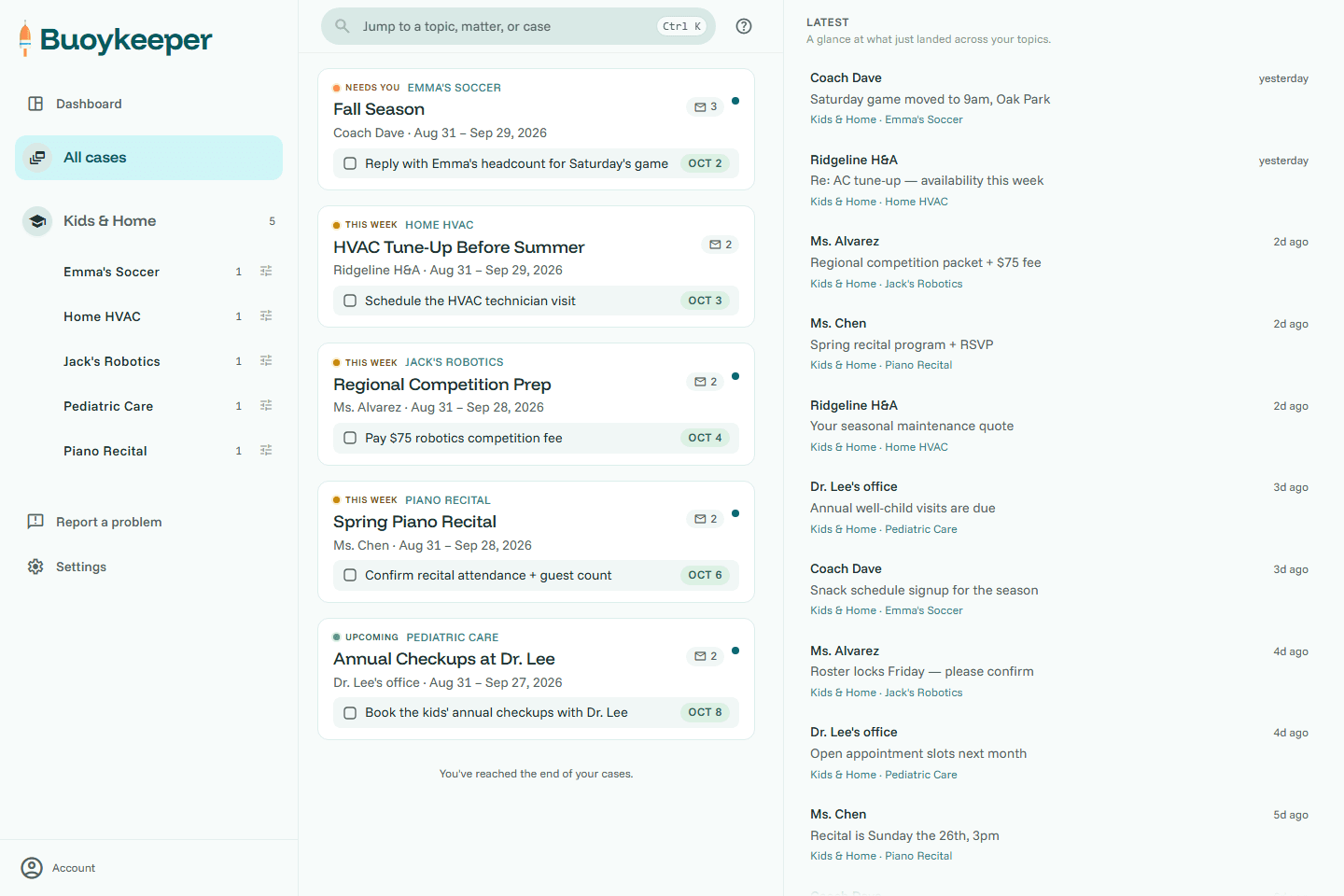
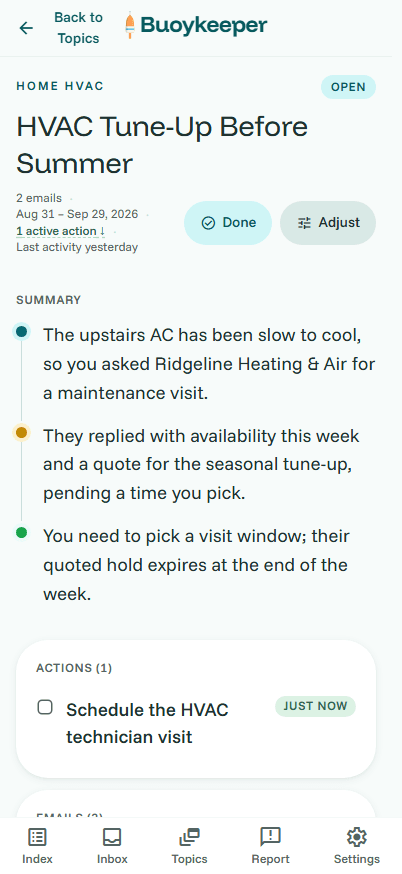
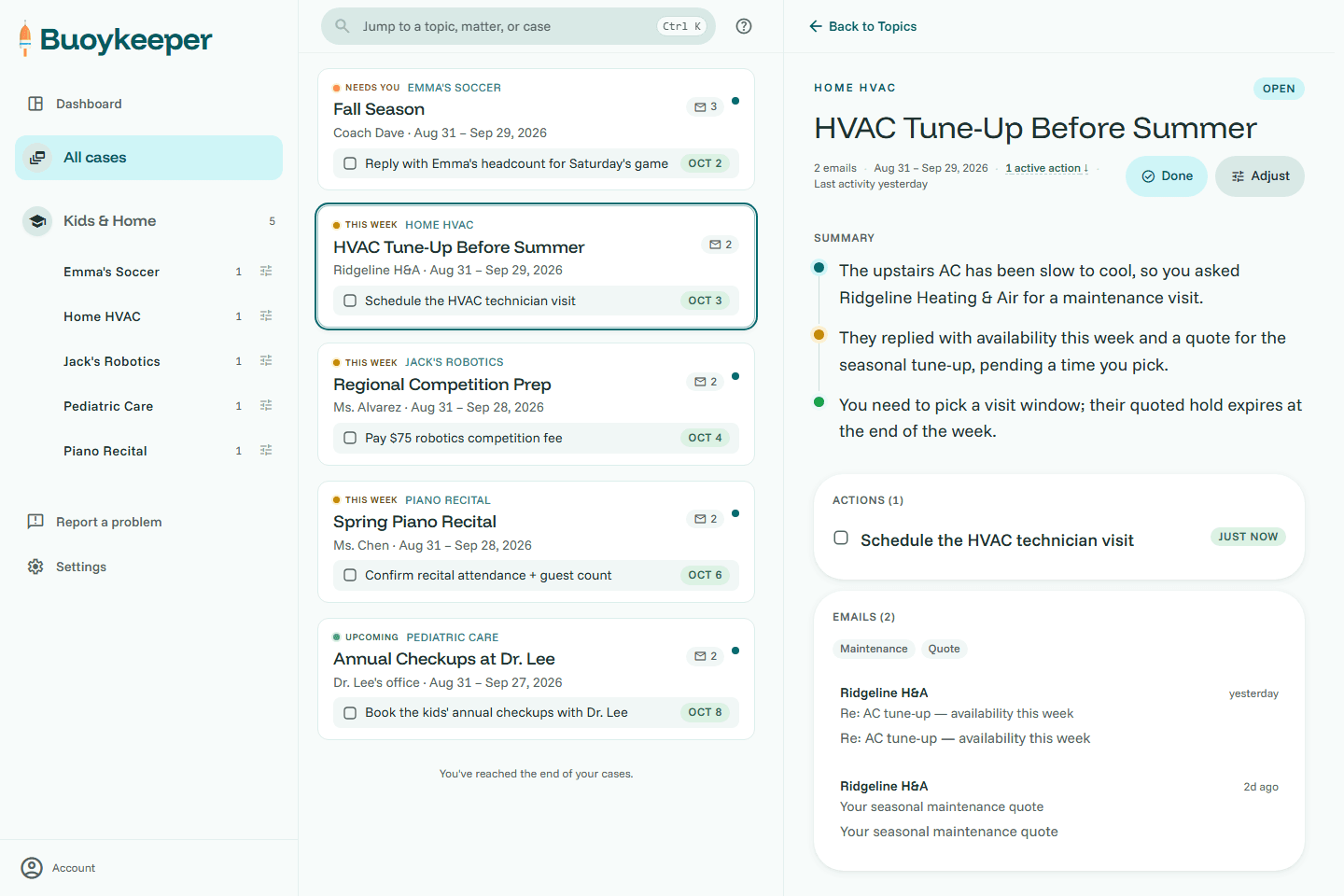
What Buoykeeper does, and what it never does
You still reply in Gmail. The difference is that you already know which messages need a reply, from the cases Buoykeeper builds.
We never write to Gmail
Not a draft, not a send, not a mark-as-read. The access we ask for is read-only, and Google enforces that before a request reaches us. See it on Google's own page →
Nothing to undo
Stop using Buoykeeper and your inbox is exactly as you left it.
No ads, ever
Email organized this well is worth paying for. We will never sell ads. Ever.
Never used to train AI
We use AI to build your cases, never to train an AI model.
We store the minimum the product needs
What it takes to build your cases, never the full contents of your email.
Yours to delete, any time
Delete your account in Settings and everything tied to you is erased on the spot.
Stay on top of your inbox, automatically.
Connect Gmail, give a few hints, and get the relief of seeing exactly what matters in your inbox.
Read-only. Free during the beta. Nothing to undo.